3 tools to search within del.icio.us
David Weinberger recently posted a transcript of a talk given by Joshua Schachter at the Berkman Center, which revealed some interesting figures: currently del.icio.us has 10,000,000 posts with 5,000,000 unique links and 500,000 tags… There is a lot of collaboratively prefiltered and tagprocessed knowledge in there, but how can you access it?
Well, I don’t know, but there are many tools available which provide some sort of filter on the overwhelming incoming linkstream, here are a few I like:
fac.etio.us
fac.etio.us provides faceted layers on about 200,000 links from del.icio.us. Available facetes are: organization (Amazon, Apple, BBC, …), activity (art, business, design, …), place (Australia, Canada, China, …), technology (blog, css, internet, …), attribute (color, cool, daily, …), genre (article, community, diy, …), tag (art, blog, css, …), contributor, site (del.icio.us, en.wikipedia.com, msdn.microsoft.com, …), and date.
You can combine them any way you want, I love the organization facete. You can search for funny links at Microsoft, or productivity links at the BBC, and so on. (The project seems to be sleeping, though.)
popul.icio.us
popul.icio.us provides a nice overview of the most popular links which have been added for the first time within the last 24 hours / 48 hours / 7 days / 30 days and it also shows the all time favorites. This is a very low effort way of keeping up to date with trends that might emerge.
CollaborativeRank
CollaborativeRank takes an interesting approach: it computes the relevance of search results based on the expertise of del.icio.us users for each tag. It also filters out duplicates, and seems to put more weight on recently added/tagged links.
The most useful users for each tag are displayed at the top of each page, their collection usually also is a good starting point for finding interesting stuff. (It also has a list of the 500 Top Del.icio.us Users.)
On the Road

Yahoo! Travel has released a nice little planning helper called Trip Planner. It’s somehow a mashup of their own services (Yahoo! Travel, Yahoo! Maps, also leveraging Flickr somehow) with a shot of 37signals minimalism.
I don’t want to duplicate the infos given in Yahoo’s tour here (which tells all), but you basically can create trips, add items (Yahoo helps you starting out by offering suggestions from its Travel Guide), and organize your items (by category, you can schedule them, tag them, and annotate them), and share your trip with the world or a list of friends.
I just planned my next trip (to Vienna) and it really was fun to use.
DIY Memes
Beta 200.0
The MoMB just hit a mind-boggling 200 entries mark.
It’s not part of the mission of the museum to be judgemental, but believe me, there are quite a few (well known and not so well known) pearls of beta wisdom inside.


Googlemarks
Google recently blurred its Search History with its Personalized Search and added bookmarking into the mix.
From Googles Help:
Bookmarks are a set of links to your favorite websites. When you are browsing your Search History, just click the star next to one of the search results listed to create a bookmark for that website. Once you’ve starred a site, you can click the “Edit” link to add a label or notes for the site. You can then view the bookmarks for specific labels using the links on the left side of the page. The labels and notes you create for bookmarks are also searchable.
Michael Arrington’s take is that Google Targets Del.icio.us (but bookmarks are not public yet, and they require too many steps to be created, and del.icio.us’ commanding network effects could be hard to top as seen with Yahoo’s My Web 2.0, so they better acquire them), but there is no indicator that they are up to anything social here.
It’s more about turning one’s individual search-, click- and attention stream into a monadic Gmail inbox.
The way it works is actually pretty odd if you think in terms of bookmarking: you need to log in with your username and password, and then forget about it and search with Google for stuff. Whenever you click on a link, Google adds it to your Search History, but there is no way of explicitly bookmarking a resource you didn’t find it via Google. (It also won’t add a link to the list, if you opended it in a new window.)
Once you’re done, you can browse within your Search History very much the same way you would browse/process your Gmails: search for text within them, remove items, or flag items as bookmarks and associate them with labels/tags. I found it to be useful to clean up my Search History every once in a while, but this is a pretty powerful tool.
Prophylactic Bookmarking
As of today 44 people already have bookmarked Google’s obviously soon to be launched Calendar: http://del.icio.us/url/268bbf8819910d50e45acbd68ff73375.
common tags are:
37 google
29 calendar
8 tools
6 web
5 cool
4 tool
3 useful
3 gtd
2 organization
2 ajax
The Museum of Modern Betas
May I introduce: MoMB – a Museum of Modern Betas. I actually just wanted to give the latest and greatest release of Textpattern a try this weekend, but then wasn’t able to stop…
The Real World 2.0
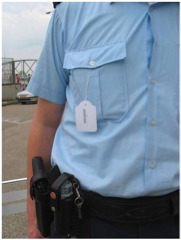
Mediamatic’s Physical Metadata project frees tags from their restriction of being attached to online objects, and takes them into the real world.
55 words were printed on cards (tags, really) and could be attached to real objects in the physical world. More examples of what happened can be seen on http://www.flickr.com/photos/tags/physicalmetadata
Gunja - a bare bone Wiki

I thought hard about this, but there definitively is no way for a Wiki to be any more minimalistic than Ben Nolan’s Gunja. Like TiddlyWikis Gunja lives in a single HTML-file, but forget about all fancy fading effects, all you get is:
- a square box for entering text
- a button for creating a link from selected text
- a button for going to your start page
And this is where the magic happens: that’s basically all you need (for many use cases). Check it out, it’s focused and fun
Semapedia
I love stuff like that:
Semapedia “combine[s] the physical annotation technology of http://semacode.org with the availability of high quality information using the free online encyclopedia Wikipedia.org” and thus “provide[s] free relevant ad-hoc high quality information to mobile users in the real world.”
a semacode is an optical barcode that contains a URL internet address, e.g.:

With Semapedia technology you can connect physical entities with their wikipedish representation via attaching semipedia printouts to those physical entities – a reentry of the symbolic into the real. Details of how to do it and the soft- and hardware requirements are given here.