Dead Man Blogging

How lovely: the diaries of Austrian writer Franz Kafka (written between 1910 and 1923) are now republished as blog (both in German and English).
(via Spreeblick)
How to Browse Your Furl Archive Locally
One of the nicest features of Furl (if you don’t use it you might want to check it out – in a nutshell: it allows you to save and annotate any webpage keeping it accessible even when the original is gone) is that you can download the archive of your furled pages.
The only problem is that the filenames of your pages are rather insignificant (80000/1/1/80000_1761411.html).
Here is one easy way to create a locally browsable view of your Furl archive:
(1) grab and extract the Zip archive of your saved documents
(2) grab the Furl XML format for saved documents and change two lines
(3) grab a XSLT stylesheet (don’t worry)
(4) open in browser
(1)
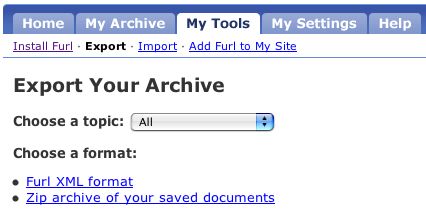
in Furl go to My Tools – Export (see the pic above);
right click Zip archive of your saved documents and save it to your disk;
extract the files;
(2)
still in My Tools – Export (left-) click on Furl XML format and save the result (which will look odd) as furl.xml to your disk;
open it and change the first two lines from
<?xml version="1.0" standalone="no" ?>
<!DOCTYPE archive SYSTEM "http://www.furl.net/archive.dtd">
to
<?xml version="1.0" ?>
<?xml-stylesheet href="furl2html.xsl" type="text/xsl" ?>
(3)
right click this XSLT stylesheet and save it as furl2html.xsl;
(4)
open furl.xml in your browser (there is one caveat: the browser should be able to handle XSLT. Firefox does, Safari doesn’t, I’m not sure with IE.)
you should see a beautiful list of all your furled pages which you can take on the road or wherever you go ;)
Burn Holy Feed Burn
I’m testdriving Feedburner for the RSS feed of this blog, I hope I didn’t break anything. Please let me know if you experience any problems.
Yubnub

Good ideas are usually pretty obvious, yet no one had thought about it (or acted upon it) before. yubnub from Jon Aquino is the result of one of those shiny moments. It’s a (social) command-line for the web, which means that you don’t click your way through the various webservices you might use anymore, but learn a few commands and trigger the services by typing the corresponding command withing your browser (and hit enter).
This is really fun (and a great timesafer), and there are tons of commands available already (the golden eggs are the most popular ones), but if you are missing something you also can generate your own.
Next Action Balls 13
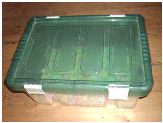

current snapshot of my next action balls basket
Well, after quite some time taking an almost exclusively paper based / analog approach for organizing my work-, info-, and data flows, the more toolish parts of my brain started feeling itchy and scratchy, and I started to use a few applications again (Basecamp, local Wikis, and most enjoyably Edward Vielmetti’s shuffle theory of management suite.) Hence the basket was closed for a while.
Technorati Makeover
Technorati obviously took a good look at the webapps from 37signals and the like and released a fresh new Public Beta.


One great improvement is that you are now able to access not only the very latest results for any (keyword, URL, or tag-based) query you’ve made, but to specify an offset or to page back within the results. E.g. http://beta.technorati.com/tag/Technorati and http://beta.technorati.com/tag/Technorati?start=200 – see the bottom of the page (this feature actually was available before, but only if you used the Technorati API.)
Another cool new feature is the extented Option Panel you can access here or whenever you click on ‘> Options’.
Delicious Again
del.icio.us moved to new servers and seems to be back to glorious old speed. It’s a free (and insanely great) service, and it’s run on limited resources, so I try to resist any demands (for speed,…) and make the best of the features available, but waiting for 10 or 20 seconds for del.icio.us to respond was an exercise in patience and zen lately.
Some fresh features:
- you can switch between a list and a cloud view for your tags
- you can sort your tags alphanumerically or by frequency
- the posting interface now provides 3 lists (popular tags, your tags, and recommended tags)
- and suggestions, which display possible completions as you type (implemented via plain old JavaScript but not AJAX!)

Unique Information Proposition
Amazon started to display SIPs (Statistically Improbable Phrases) for books. In a nutshell: the SIPs for a book is a collection of terms or phrases within this book which are most unique in comparison to all other books (see Amazons definition here).
The SIPs for Getting Things Done for instance are: your open loops, nonactionable items, natural planning model, next physical action, defining your work, your action lists, reference filing, action reminders, organizing you, collection buckets, daily files, tickler file, mind like water, project thinking
- which actually isn’t that bad and would make a great reference for picking essential but not utterly obvious tags for various resources, if this service would be available for them as well. (SIPs for e.g. Blogs would be great.)
via del.icio.us/plasticbag
A del.icio.us furl Workflow
I just loooove del.icio.us. Here is a little tip for mixing in the best of Furl to add persistence to your valuable bookmarks:
Furl is another social bookmarks manager, and – unlike del.icio.us – Furl also saves copies of the websites and allows a full text search within your archive. I do prefer the minimalistic beauty of del.icio.us for everyday use, but I want some of my del.icio.us bookmarks backed up in Furl, just for the case they die (the average website has the lifespan of a horsefly).
Luckily Furl provides the possibility to import bookmarks from del.icio.us. Now it’s possible to stove in just everything from del.icio.us, but I prefer a hand picked selection of articles, postings, and the like – mainly for two reasons:
- there is no added value in saving and searching the front page of google or slashdot or some webservice.
- these ressources pollute the rest (probably no big deal if you have 100 bookmarks or less, but cumbersome if you want to page through 2000 articles in steps of 25). OK, you always can search or browse by topic, anyway…
So here is one way to do it:
(1) bookmark and tag like mad in del.icio.us, but add a special tag (e.g. 2furl) for the articles you want to save in Furl later.
every few days:
(2) export the bookmarks tagged with 2furl :
open http://del.icio.us/api/posts/recent?tag=2furl in your browser (you’ll have to identify yourself with your delicious username and password);
save the result (you might not see anything, but it should be there) to your disk (e.g. as 2furl.xml).
(3) import this file to Furl:
in Furl go to ‘My Tools’ – import;
select the file you just created;
make sure ‘Import from del.icio.us’ is selected and ‘Save files..’ is checked;

click ‘Import It’ (this might take a while);
(4) back in del.icio.us delete or rename the tag 2furl (in settings – tags) so you can start fresh again. I prefer to rename it to something like furled, so I can see right within del.icio.us whether I’ve already furled a link)
(5) start happy bookmarking again
This might seem a little complicated, but once you have done it two or three times, it will take you less than a minute (and made me sleep just a little bit better).
Links:
If you don’t mind popup windows you alternatively might want to check out Alan Levine’s Multipost Bookmarklet Tool which is pretty cool and can be configured to accomplish pretty much the same.
Furl and Del.icio.us: Almost Perfect Together is an excellent introduction to del.icio.us and Furl.
—
Comments:
The export/import capabilities are good to know. I still vastly prefer Furl, but I really hope that interoperability will be maximized. That’s why I love Technorati Tag searches. I just wrote an entry on getting the most out of Furl on my blog (http://marshallk.blogspot.com) and much of it would apply to delicious as well. Most important to me is that the user base be expanded into as many demographic groups as possible, for maximum value via the social part of social bookmarking.
posted by Marshall Kirkpatrick : 5/26/2005 03:16:30 AM
interesting. that adds some foreigh matter to my cornflakes.
should i think again, i wonder?
posted by James Governor : 11/04/2005 02:22:53 PM
Panic Clutter
According to the Wahington Post, President Reagan’s attempts
at conciliation with the Soviet Union in Geneva in 1985 included
a vow that the U.S. would join the USSR in case Earth was invaded
by aliens from outer space.
from the Panic Encyclopedia (edited by Arthur Kroker, Marilouise Kroker, and David Cook)
Found this hilarious book from 1989 during a heavy anti-clutter session this weekend. It’s out of print, but available for free download (after informal registration) here and a pretty weird reading. The book is in retrospect a very innocent and nostalgic compilation of some symptoms and phantasms of the eighties, a time when one could phantasize about cyberflesh or speak about post-xxisms without flushing.
As for the clutter: I found it tremendously useful to set some quantifyable goals for myself (I tried to get rid of 10% of everything, tossing 80 books and 200 LPs along the way). It’s odd that it always feels deliberating once you got rid of stuff, but that the act of getting rid is so hard.