Paradigm Shift Revisited Again
omg, Blog before you Think! turned 15 today:
Hmm, a few days ago I got invited for a Gmail account. A few days later I finally gave del.icio.us a try. Both technologies changed the way I do certain things almost instantly and probably for good. Both give up with hierarchical structures of organizing data (folders within folders within folders within folders…) and use a flat model applying labels (label combined with label combined wiith label…). More on that is coming up soon here, but if you are not aware of those services, do yourself a favour and check them out.
Anyway, starting a blog was left on my todo list for 2004, so here it is. Staying consistent with the subtitle of this blog – be prepared to encounter various ramblings and thoughts in progress here. Topics might include OS X (highly likely), GTD (my current affection), enjoying the web, music, system theory, programming, mind- and lifehacks, television,… nothing special.
Paradigm Shift Revisited
omg, Blog before you Think! turned 10 today:
Hmm, a few days ago I got invited for a Gmail account. A few days later I finally gave del.icio.us a try. Both technologies changed the way I do certain things almost instantly and probably for good. Both give up with hierarchical structures of organizing data (folders within folders within folders within folders…) and use a flat model applying labels (label combined with label combined wiith label…). More on that is coming up soon here, but if you are not aware of those services, do yourself a favour and check them out.
Anyway, starting a blog was left on my todo list for 2004, so here it is. Staying consistent with the subtitle of this blog – be prepared to encounter various ramblings and thoughts in progress here. Topics might include OS X (highly likely), GTD (my current affection), enjoying the web, music, system theory, programming, mind- and lifehacks, television,… nothing special.
Bloglines Sentiments
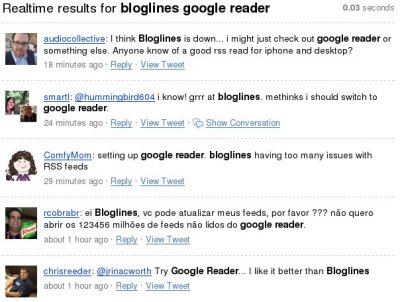
I feel sad that Bloglines [bloglines.com] continues to deconstruct itself. Feedreaders are like a relationship after all. There are plenty of them out there, each one with its own bundle of strengths and weaknesses. But at some point you’ve got to choose and then better stick with it. Since we spend a lot of time with them, even the shortcomings become likeable. At least we arrange ourselves, develop little hacks and workarounds, and learn to live with them.
Over the last couple of weeks Bloglines has had a few issues. Feeds have not been updated, sometimes none of them for a couple of hours, sometimes the site was just down. But stuff happens and every site has problems every once in a while. What I don’t get though is the communicative stealth mode of Bloglines regarding these problems. There is no blog, no section indicating current issues, nada.
A simple search on Twitter shows that a lot of users – hundreds, probably thousands – are jumping ship and switching to Google Reader. Is this what they want? I believe many of them would have stayed, if they simply gave us a nod that they are aware of the issue and working on it.
Zero social
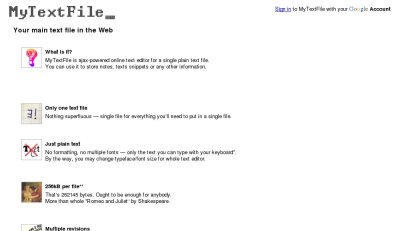
At the end of the day all you need to manage your life is a single text file – and "_ MyTextFile [mytextfile.com/] will give you no more and no less.
MyTextFile is a minimalistic online text editor for a single plain text file. If you want to go fancy you can chance the typeface/font size or the color scheme. MyTextFile also has built-in revision control and will autosave your document every five minutes. And that’s about it. I love it.
Google Reader Productivity
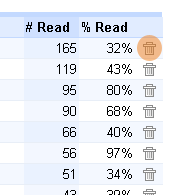
One of the overlooked productivity features in Google Reader are those little trash can icons in your personal Reading trends (home → trends → Reading trends). Just hit unsubscribe for the feeds which consumed most of your time and make room for an extra hour each day.
Wiki Clock

This is the Wiki Clock [pageoftext.com/wikiclock] – a clock that runs on Wiki technology!
Please update this page with the correct current time (UTC).
Next Action Balls 16

current snapshot of my next action balls basket
Holy crab, the last entry in the Next Action Balls series was written 8 month ago.
Basically back to paper. Paper rules.
Unobviously Obvious
Google has a very weak incentive to “support” content of quality. Put another way, Google’s incentive to “support” content creators diminishes in quality.
Think about this intuitively: the more crap there is, the more stuff you have to wade through – the happier Google is (at least in the short run).
Let me put this even more succinctly. Google doesn’t care about absolute levels of quality – it only cares about relative levels of quality. And the more media it indexes, the stronger this dilution of incentives gets.
Pet-cha
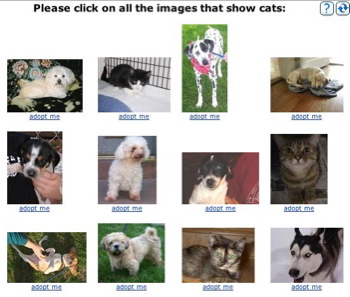
Cute project from Microsoft Research (who knew?): Asirra
Asirra (Animal Species Image Recognition for Restricting Access) refines captchas by asking users to identify photographs of cats and dogs and is offered as a free web service.
They’ve partnered up with petfinder, who provided Asirra
with over two million images of cats and dogs, manually classified by people at thousands of animal shelters across the United States. In exchange, we provide a small “Adopt Me!” link beneath each photo, supporting Petfinder’s primary mission of finding homes for homeless animals.
Tag Descriptions
del.icio.us just added Tag Descriptions which let you annotate your tags to provide some sort of explicit reflections on your tagging heuristics.

I really admire Joshua Schachter for his ability to innovate (sometimes seeing the obvious first vs. adding features), for his resistance against popularity contests (i.e. digg, Technorati WTF) and for leaving out the crap.